

留日センター棟のPC教室の鍵の管理について
2026年9月29日:教務課 久永さん、川澄
2026年夏、研究講義棟のPC教室(216・217・323)を留日センター棟(302・303・405)へ移転した。
- PCが多数設置されているため、PC教室(留日302・303・405)は常時施錠する。
- 鍵は教務課・教育情報化支援室でそれぞれ保管し、教員はいずれで借りてもよい。(メモ参照)
- 授業間の休み時間が10分の場合は、鍵を教卓上で次の教員へ引き継ぐ。(セキュリティ上のリスクは許容範囲内と判断)
留日302・303
- 前方扉はオートロックのため、入室時は必ず前後両方の扉を開錠する。
- 退室時は前後両方の扉を施錠する。
- 連続する授業で鍵を教卓上で引き継ぐ場合は、後方扉を開錠したまま退出する。次の教員は後方扉から入室する。
- 前方扉を学生の出入口として使用する場合は、授業開始・終了時のみ、ストッパー等で扉が閉まらないようにする。
留日405
- オートロックはないが、302・303との運用統一のため、前後両方の扉を開錠・施錠するよう案内する。
メモ(2027年度へ向けて)
- 教員のキャンパスカードでオートロックを解除する運用も理論上可能だが、権限管理等が必要なため、現時点では導入を見送った。本件については引き続き教務課と施設企画課で検討する。
- 2026年度秋学期は、教務課より、鍵は教務課・教育情報化支援室のいずれでも借りられる旨を教員へ案内済み。特段の問題がなければ現行運用を継続してもよいが、必要に応じて、2027年度以降の貸出窓口の統一を検討する。
Commemorative ballpoint pen
To commemorate the 100th utilization, we have created a 4-color + Sharpie ballpoint pen. We have a few extras, so if anyone would like one, please contact Kawasumi at the Educational Informatization Support Office. (We would be very happy if you could spread the word about TMS by bragging about it to your colleagues and others!)
what to do
Checked and added "under confirmation" on the floor map.
- We will gradually upload training videos for beginning staff and videos related to support for annual events.
- We will summarize the basic policies and criteria for cases that may be difficult to determine.
- If you are unsure about a decision due to an unprecedented request, etc., there is often no time for everyone to consider the issue, so the staff member who responded to the request should carefully listen to and respect the intentions of the visitor (including faculty, staff, and students), while responding flexibly on the spot.
- However, in the medium to long term, we hope to form a common understanding among the staff. If you are not sure about a case, please report it to everyone in jshien's mailis, even after the fact. We will discuss the policy and criteria in consultation with the Academic Affairs Section as well.
- We will upload useful information, such as canned sentences that can be copied and pasted, and notes on frequently researched information.
Points of Ingenuity
- A PTZ camera that can freely change camera angles with a remote control was used to deliver realistic images to the Zoom side, including the faces of the presenter and moderator, and the participants. The camera angles of "presenter," "moderator," and "venue (pull)" can be registered as preset positions to enable smooth camera work.
- During the presentation, the main part of the event, wireless microphones were used as external microphones for the YAMAHA YVC-1000 so that high-quality audio could be sent to the online side.
- On the other hand, for the reception after the event, a 360˚ omni-directional sound-collecting microphone, a child of the YAMAHA YVC-1000, was used so that the audience and the online side could converse amicably.
interpoint (interword separation)
- The Zoom host PC was connected to the venue projector via HDMI, and the presenter's slides were output from the host PC to the venue via Zoom. Although there is a slight time lag, this setup provides peace of mind in the sense that if it is visible at the venue, it is also visible online.
Assisted in setting up an online talk show with director Irene Gutierrez at the screening of the Cuban film "Between Dog and Wolf" at Prometheus Hall.
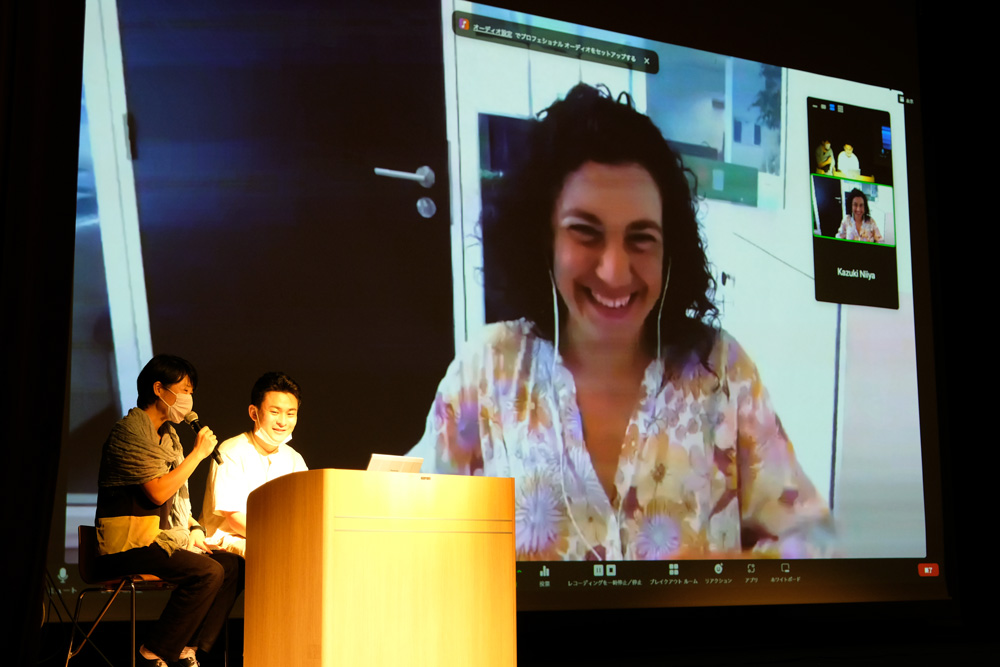
Connect with international directors online
- The sound system in Prometheus Hall was connected to the Zoom host PC via a mixer in the sound control room and set up to allow two-way interaction between the online side and the venue side.
- The faces of the participants on the online side were projected on the venue screen to create the illusion of a dialogue with the entire audience.
Sound and image quality sent to the other party
- We placed the highest priority on the quality of sound sent to the online guest (a filmmaker connecting from overseas), and used a dynamic microphone for the audio at the venue.
- The ceiling camera was used to transmit a video of the venue to the online side of the room to convey the scene of the event and make it easier for the online side to talk to the audience.

See also.Tokyo University of Foreign Studies Official Website TOPICS (2022.8.29)
Uh-oh
 Aa.AAAAAAaaaaa AAAAAA link link link link
Collaboration with other campus organizations
- Office of Online Learning Support (OLST)
- Together with our office (Room 202), this organization constitutes the "Education Informatization Support Center" and is located on the 3rd floor of Agora Global. It mainly provides support for Moodle, creation of self-study materials, construction of educational sites/programs, collaboration with other universities, and other project-based support.
- Integrated Information Collaboration Center (ICC)
- The ICC installs PCs throughout the campus, maintains wireless LAN and other networks, and manages security, accounts, and licenses. Application forms for reissue procedures for lost passwords can be filled out in this office (Room 202) and submitted to ICC.
- academic affairs section
- The Room is administered for operational purposes. If you are not sure whether your use of the service corresponds to the "class" support for which the room was established, please consult with the Academic Affairs Section first.
- guardroom
- When this room (Room 202) is closed on weekends, holidays, etc., we cooperate with the guardroom by keeping loaned equipment in the guardroom.
- TUFS Academic Support Center (TUFSAPO)
- LAN cables (for private booths on the 1st floor of the Research and Lecture Building), which are loaned to students by Tafushippo, can also be borrowed from the Support Office (Room 202) when Tafushippo is closed.
In addition to the above, we work with a variety of other organizations.
Table of Contents
Along with this support office, the Online Learning Support Office (OLST) has been established to carry out the above goals.
| organization name | Main Business |
| Multimedia and Computer-Aided Education Support Center | Support mainly in terms of hardware, including classroom equipment, loaner equipment, and Zoom class equipment for remote lectures |
| Online Education Support Office | Project-based support, including Moodle support, creation of self-study materials, site/program building, and collaboration with other universities |